Getting started & onboarding
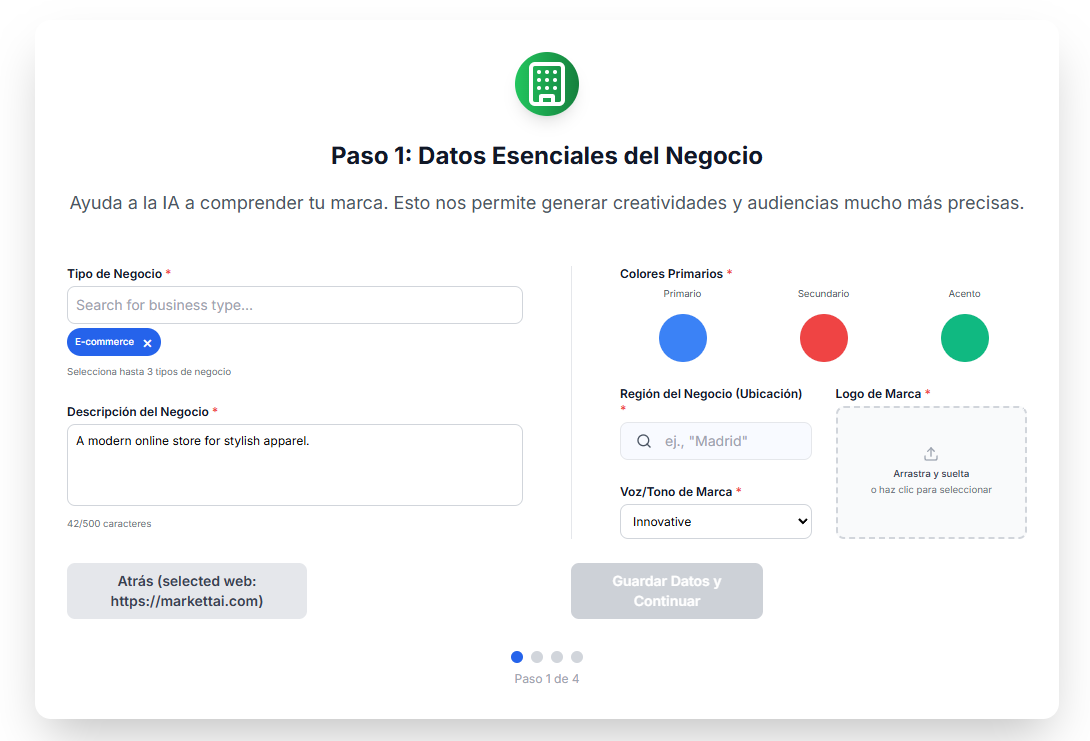
Step 1: Essential Business Data
This is the first critical step for the AI Engine. Here you collect the fundamental information that the AI will use to generate accurate creatives, optimize campaigns, and find your ideal audience. The more detailed this information is, the better your campaigns will perform.
Phase 1.1: URL and Automatic Analysis
- 🔗 Website URL: Enter the address of your business (e.g., yourclinic.com).
- 💡 Assisted Option: The application will offer "Analyze and Auto-Fill". If your website is complete, the AI will extract the business type, description, colors, and logo, saving you time.
- 📝 Manual Configuration: If you choose this option, or if the URL does not work, you must manually fill in the fields in Step 1.2.

Phase 1.2: Brand and Personality Data
This information is crucial for the AI to generate creatives and ad copy with the correct voice of your business. Complete the following fields:
- 📋 Business Type, Description, and Region (for geographic segmentation).
- 🗣️ Brand Voice / Tone: Choose the tone the copy should use (e.g., Professional, Friendly, Exclusive).
- 🎨 Brand Colors and Logo: Upload your logo and set the main color codes so that all visual creatives are consistent.